









Creating a home workspace that is both clutter-free and functional can make a significant difference in your productivity and overall work experience. Whether you’re working remotely full-time or just need a dedicated area for occasional tasks, organizing your space well helps you focus and feel more comfortable. Here are some practical tips to help you set up a tidy, inspiring, and efficient home office.
1. Choose the Right Location
Selecting the best spot in your home for your workspace is the first step. Ideally, this area should be quiet, have good natural light, and be away from high-traffic living spaces.
– Consider natural light: Position your desk near a window if possible to enjoy daylight, which can improve mood and energy.
– Limit distractions: Choose a corner or separate room to reduce interruptions from family or household activities.
– Ensure accessibility: Your workspace should allow easy access to power outlets, internet connection, and office supplies.
2. Invest in Ergonomic Furniture
Comfort matters when you spend hours working at a desk. Ergonomic furniture supports your body, reducing strain and fatigue.
– Desk: Use a desk size that fits your work requirements without overcrowding. Consider adjustable desks for alternating between sitting and standing.
– Chair: An adjustable chair with good lumbar support helps maintain proper posture.
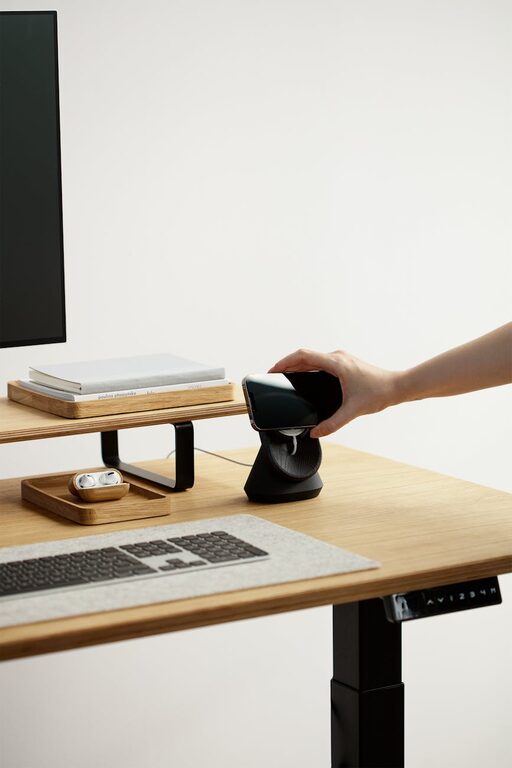
– Accessories: Use a keyboard tray, monitor riser, or footrest to align your workstation ergonomically.
3. Declutter Your Desk Regularly
A cluttered desk can lead to distractions and decrease productivity. Make daily habits to keep your workspace tidy.
– Limit essentials: Only keep items you use regularly on your desk, such as your computer, notebook, and a pen holder.
– Create a ‘landing zone’: A small tray or drawer to hold mail, receipts, or miscellaneous items keeps surfaces clear.
– Minimal décor: Use simple decorations to personalize your space without causing visual clutter.
4. Use Smart Storage Solutions
Maximize your space by organizing supplies and documents effectively.
– Drawers and cabinets: Utilize filing cabinets or drawer organizers to keep paperwork sorted and out of sight.
– Shelves: Wall-mounted shelves free up desk space and store books, reference materials, or decorative items.
– Boxes and bins: Label storage boxes to easily locate smaller supplies like cables, chargers, and stationery.
5. Set Up Efficient Cable Management
Cables can easily become tangled and messy, distracting you and making the area look untidy.
– Cable clips and ties: Use clips to secure cables along the edges of your desk and ties to bundle extra lengths.
– Cord covers: Cover cables running along the floor to prevent tripping and keep the workspace safe.
– Wireless devices: Consider wireless keyboards, mice, and headphones to reduce cable clutter.
6. Personalize Your Space Wisely
Adding personality to your workspace can enhance creativity and make working at home more enjoyable.
– Incorporate plants: Small indoor plants improve air quality and add a touch of nature.
– Display meaningful items: Photos, artwork, or motivational quotes can provide inspiration without overcrowding the area.
– Color coordination: Use a consistent color scheme for accessories to create a harmonious look.
7. Maintain a Regular Cleaning Routine
Routine cleaning prevents dust buildup and keeps your workspace inviting.
– Daily: Wipe down surfaces and organize documents at the end of each day.
– Weekly: Dust furniture, vacuum floors, and sanitize electronic devices.
– Monthly: Review your storage solutions and declutter unnecessary items.
8. Optimize Lighting for Productivity
Good lighting reduces eye strain and keeps you alert.
– Task lighting: Use adjustable desk lamps to focus light where you need it most.
– Ambient lighting: Combine natural light with soft overhead fixtures to create a balanced atmosphere.
– Avoid glare: Position monitors perpendicular to windows to minimize screen reflections.
9. Use Technology Wisely
Technology should simplify your work, not create more mess.
– Digital organization: Use apps and cloud storage to reduce paper clutter.
– Device placement: Keep frequently used tech within reach but organize them neatly.
– Regular updates: Maintain your software and hardware to avoid technical frustrations.
10. Separate Work and Relaxation Areas
If possible, keep your workspace distinct from leisure areas to help maintain focus during work hours and relax afterward.
– Visual boundaries: Use rugs, screens, or furniture arrangement to define your work zone.
– Close the door: If your space has a door, close it when working to signal “work time” to yourself and others.
– End-of-day routine: Clear your desk and turn off work-related devices to mark a psychological break.
—
By following these tips, you can create a home workspace that is not only free of clutter but also designed to support your productivity and well-being. Remember that organizing your home office is an ongoing process, and small improvements over time can make a big difference in your workday.